
Figma Config 2026: The Canvas Became the Product
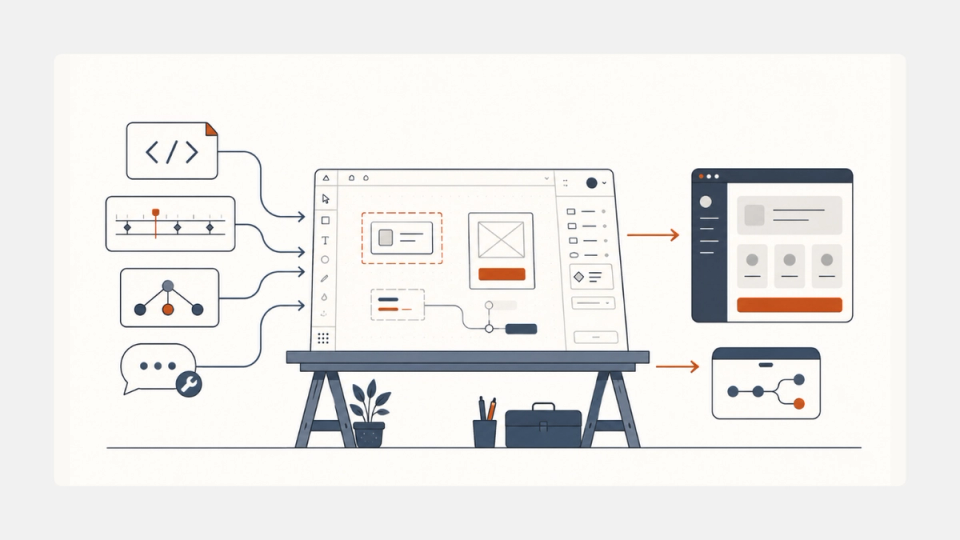
Figma used Config 2026 on June 24, 2026 to launch code layers, Figma Motion, shader effects, generative plugins, Weave tools, and a more capable design agent, according to its official Config 2026 recap. The feature list is long, but the strategic read is simpler: Figma is trying to turn the canvas into the place where software gets imagined, tested, refined, and increasingly shipped.
That matters because Figma already sits unusually close to the product handoff. The company now serves 13 million monthly users and 95% of the Fortune 500, according to the Financial Times. If a company with that distribution starts collapsing design, code, motion, and agent workflows into one surface, this is not just another Config keynote. It is a serious platform move.
The useful context is that this outcome was visible in fragments before the event. Our earlier preview, Figma Config 2026: What's Actually Coming, argued that the real story would be whether Figma could push beyond prototyping toys. Config answered that more clearly than expected.
What happened
Figma's official recap says the 2026 launch wave centered on “code layers, Figma Motion, shaders, generative plugins and Weave tools, all on the canvas” (Figma recap). That wording matters. Figma is not positioning these as separate products. It is positioning them as materials and workflows that all belong inside the same working surface.
The biggest launch was code layers. Figma says teams can generate a code layer with the agent, start from a template, or import an existing GitHub repository into Figma Design. From there, the code can be explored on the canvas, converted back into editable Figma layers, revised, and pushed back to the repo. Figma says code layers are rolling out in closed beta over the next few weeks.
The second major launch was Figma Motion. Motion adds a timeline directly on the canvas, lets teams animate components and variables, and makes those timing values inspectable in Dev Mode. Figma says Motion is in open beta as of June 2026, with limited access for Starter users and fuller motion capabilities on paid plans.
The third pillar was the upgraded design agent. Figma says the agent can now build reusable plugins and shaders from prompts, work with dropped-in files, read linked Figma files with structure intact, and pull outside context through MCP connectors from tools like GitHub, Atlassian, Slack, and Hex. The same post says the agent is in open beta for Full seat users on Professional, Organization, and Enterprise plans, and free during beta.
Then there is Weave, Figma's node-based generative workflow layer. Figma's recap frames the current release as the first step toward a deeper Figma-Weave merger, while The Verge reports that Figma brought more than 20 integrated Weave tools onto the canvas at Config.
None of that is a small add-on. It is a bet that the future design file is not a handoff artifact. It is the product workspace itself.
What it actually means
Is this just another AI feature dump?
No. Config 2026 matters because Figma tied its AI features to execution surfaces, not just prompt boxes. Code layers touch repositories. Motion exports usable animation data. Agent chats pull external context. Weave tools sit on the same canvas as design work. That is a much more serious move than sprinkling generation across menus.
The non-obvious part of Config is that Figma is not mainly chasing prettier mockups. It is trying to own the high-leverage middle of software creation: the messy zone where product ideas become testable interfaces, then production-bound code. That is the same broad direction we have seen in AI-native tooling like Cursor 3 Isn't an IDE Anymore. It's a Control Room., where the winning interface is increasingly the orchestration layer, not a single-purpose editor.
Figma's wording around code layers is the clearest tell. In its launch post, the company says “interactive code becomes part of the canvas itself” (Figma code layers). That is a much more ambitious claim than “prototype faster.” It suggests Figma wants the design canvas to become a live staging ground for real software states.
Why do code layers matter more than Motion?
Code layers matter more because they attack the oldest and most expensive gap in interface work: the handoff between static design intent and working implementation. Motion is important, but code layers change who the canvas is for and what decisions can happen there.
Motion is still a meaningful release. Figma says the full timeline becomes visible in Dev Mode, with inspectable timing values, easing curves, and keyframes, and that teams can copy animation code directly into CSS as of June 2026 (Figma Motion). That should reduce one of the classic design-to-dev losses, where motion survives the keynote deck but dies in implementation.
But code layers are the real center of gravity because they blur authorship. Designers can compare live coded alternatives on canvas. Engineers can bring a repository into the same conversation. PMs can react to actual behavior instead of static approximations. That is closer to a shared product lab than a design file.
It also fits the larger interface trend we flagged in Magic Pointer Could Kill the Agentic Browser: the valuable AI product is not just the model. It is the surface where intent, context, and action come together fast enough to feel native. Figma is now trying to make the canvas that surface for product teams.
Does this put Figma into direct competition with IDEs and AI builders?

Yes, but selectively. Figma is not replacing the IDE for serious engineering work tomorrow. It is competing for the upstream part of product creation, where teams explore flows, tune interaction, generate working UI, and decide what gets built next.
That is why the code layers story matters more than the shader story, even if shaders are flashy. Figma can afford to lose the “best code editor” race and still win a much larger one: becoming the default system where product intent is formed before code hardens. If that happens, the IDE becomes downstream infrastructure.
The upgraded agent pushes the same logic. Figma says MCP connectors can pull tickets, docs, chat context, and structured data directly into the design conversation (Figma agent). Once that context arrives inside the canvas, Figma is no longer merely a drawing tool with AI. It starts to look like a workflow hub.
That does not mean Figma has already won this layer. Plenty of teams will still prefer purpose-built coding agents, and the economics may look different when beta pricing ends. But the direction is obvious. Figma wants to sit closer to shipped product than any design tool has before.
Who this affects
For product designers, this is the best Config Figma has shipped in years. The upside is not just faster generation. It is tighter control over behavior, motion, and reusable workflows without waiting for another team to translate intent. The design agent's support for custom skills and reusable plugins means more teams can encode local taste instead of accepting generic AI output.
For design engineers and startup product teams, Config 2026 is a workflow compression story. If code layers can reliably pull in a repo, expose real states, and round-trip changes back without breaking trust, Figma becomes a much stronger environment for early product iteration. That is exactly the kind of tooling pressure that makes comparisons like Codex vs Claude Code vs Gemini CLI: May 2026 Verdict more relevant, because the question stops being “which model writes code?” and becomes “which surface owns the work?”
For incumbents and adjacent tools, this is more threatening than the AI design demos of 2025. The Financial Times quoted Index Ventures partner Danny Rimer saying that after the failed Adobe deal, Figma “never took their foot off the gas” (Financial Times). Config 2026 looks like the product expression of that pressure. Figma is shipping toward the same convergence zone that IDEs, no-code builders, agent shells, and browser automation tools all want.
For enterprise buyers, the story is more mixed. The new workflow looks powerful, but the official materials still leave real gaps. Figma has not publicly detailed post-beta pricing for the agent features, nor did it fully spell out how broadly code layers will work across stacks in the first closed beta. Those are not minor details. They determine whether Config 2026 is a flagship workflow for a few advanced teams or a widely deployable platform shift.
What to watch for next
The first thing to watch is whether code layers escape demo gravity. Figma's blog post makes the concept sound strong, but the product only matters if real teams trust the round-trip between repo, canvas, editable layers, and back to source code.
The second signal is pricing. Right now, both the design agent and several new creation flows benefit from beta framing. Once paid usage hardens, we will learn whether Figma wants these workflows everywhere or only in premium seats.
The third signal is competitive response. Google, OpenAI, Anthropic, and AI-native product builders are all trying to own the space between prompt and shipped software. If Config 2026 lands, expect more pressure on tools that still treat design, generation, and implementation as separate phases instead of one loop.
Over the next 90 days, the real question is simple: does Figma become the place where teams explore working software together, or does it remain the best-designed preview layer for tools that still ship elsewhere?
The bottom line
Figma Config 2026 was not important because it added more AI. It was important because Figma used AI to make the canvas more operational. Code layers, Motion, Weave tools, and the upgraded agent all point in the same direction: fewer handoffs, more live context, and a design surface that wants to stay in the workflow longer.
If you build products, the takeaway is not “go use every new Figma feature.” It is that Figma is making a credible bid to own the path from idea to implemented interface. That is a bigger shift than a keynote sizzle reel, and it is one worth watching closely.
FAQ
What did Figma announce at Config 2026?
Figma's June 24, 2026 recap says the main launches were code layers, Figma Motion, shader fills and effects, generative plugins, Weave tools on the canvas, and a more capable design agent with better context and custom skills support (Figma recap).
Are code layers available to everyone now?
Not yet. Figma says code layers are rolling out in closed beta over the next few weeks as of the launch post published on June 24, 2026. That means the headline is real, but broad availability is still behind the announcement (Figma code layers).
Is Figma Motion generally available?
Not fully. Figma says Motion is in open beta as of June 2026. Starter users get limited exports, while full seat users on all plans can access motion primitives and export features. More advanced design-system integration remains tied to paid plans (Figma Motion).
Why is Config 2026 a bigger deal than last year's AI push?
Because this year Figma tied AI to execution surfaces. The new features do not just generate outputs. They pull in repositories, expose motion in Dev Mode, use MCP connectors for live context, and place Weave workflows on the same canvas where teams already work. That is a platform move, not just a feature burst.