
Cursor 3 Isn't an IDE Anymore. It's a Control Room.
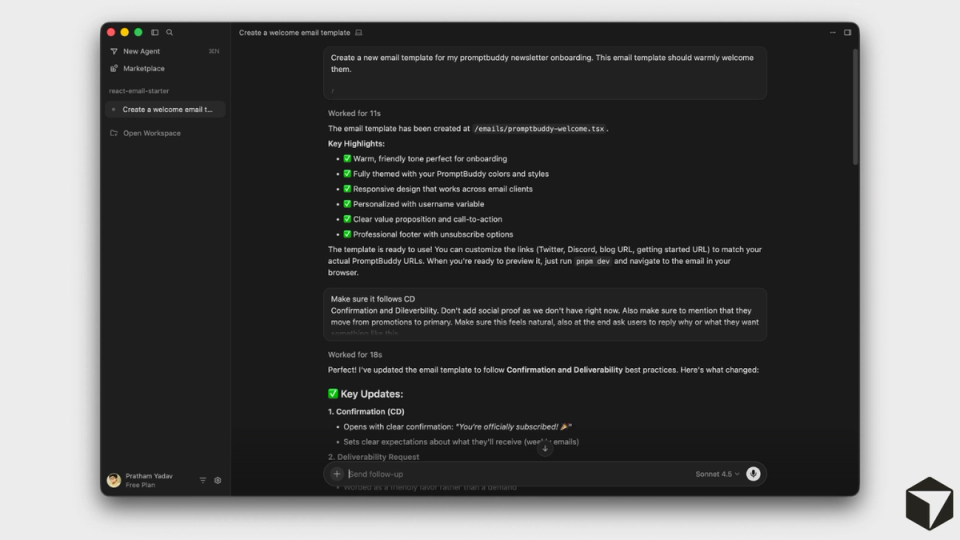
Cursor shipped version 3 on April 2, 2026, and it is not a typical update. The team rebuilt the interface from scratch around a single premise: developers should be orchestrating AI agents, not writing every line of code themselves.
The centerpiece is the Agents Window, a new standalone interface where you run multiple AI agents in parallel across different repos and environments. You can kick off agents locally, in the cloud, via Slack, from GitHub, or even from your phone. All of them show up in one sidebar. This is Cursor's answer to Claude Code eating its market share, and it's the clearest signal yet that the AI coding tool wars have entered a new phase.
Here is what actually shipped, what it means for your workflow, and the one cost problem Cursor still hasn't solved.
What Cursor 3 actually changes
The old Cursor was a VS Code fork with AI features bolted on. Composer lived in a side panel. You chatted with one agent at a time. That model worked fine when AI assistance meant autocomplete and the occasional refactor. It doesn't work when agents are writing most of the code.
Cursor 3 replaces that model entirely. The Agents Window is a full-screen workspace where each agent gets its own tab. You can view them side by side in a grid. Each agent can work on a different task, in a different repository, in a different environment.
The key features worth understanding:
Parallel agent execution. Run multiple agents simultaneously. One can refactor a module while another writes tests and a third updates documentation. Each operates in an isolated Git worktree, so they don't step on each other's changes. This solves the biggest bottleneck in AI-assisted coding: waiting for one task to finish before starting another.
Local-to-cloud handoff. Start a task on your laptop, push the session to the cloud when you need to close your machine, and pull it back when you're ready to test. This is particularly useful for long-running tasks like large refactors or full test suite runs. Cloud agents also produce screenshots and demo videos of their work, so you can verify output without pulling code down first.
Design Mode. When working on frontend code, you can toggle into Design Mode (Cmd+Shift+D) and click directly on UI elements in a built-in browser. Instead of typing "change the padding on the third button in the header," you click the button and type your instruction. The agent knows exactly which element you mean. For frontend developers, this eliminates a real source of friction.
Best-of-N model comparison. The /best-of-n command runs the same prompt across multiple models (Composer 2, Claude, GPT) in parallel, each in its own worktree. You see the outputs side by side and pick the best one. This is useful for architecture decisions where model choice genuinely matters.
Built-in Git workflow. A cleaner diffs view lets you stage, commit, and manage pull requests without leaving Cursor. This keeps the workflow tight: agent writes code, you review diffs, you merge. No context switching to a separate Git client.
The IDE isn't gone (and that matters)
A detail that's easy to miss: you can still use the classic IDE view. The Agents Window is an option, not a replacement. You can run both simultaneously. This means developers who rely on Cursor primarily for Tab completions and inline chat don't lose anything. They gain the ability to open the Agents Window when they need it.
Full LSP support, go-to-definition, and file browsing all work in the new interface. Hundreds of plugins are available through the Cursor Marketplace, including MCP integrations, skills, and subagents. For teams that have built workflows around MCPs, this is a significant advantage over competitors like Google Antigravity, which still doesn't support MCP as of April 2026.
Composer 2: Cursor's own model play
Cursor didn't just rebuild the interface. They shipped their own frontier coding model, Composer 2, in March 2026. It's optimized for agentic tasks and designed to minimize token usage while keeping output quality competitive with larger models.
According to Cursor, Composer 2 offers high usage limits at lower cost than running Claude or GPT for every task. The strategy is clear: reduce dependency on third-party model providers and give users a fast, cheap default for the bulk of their coding work, while keeping Claude Opus 4.6, GPT-5.4, and Gemini available for tasks that demand maximum reasoning power.
There is a controversy worth noting. TechCrunch reported that Composer 2 was built on Moonshot AI's open-source Kimi 2.5 model without upfront disclosure. Cursor hasn't denied this, and the lack of transparency frustrated parts of the developer community. The model's performance is real, but the origin story is messy.
The pricing problem Cursor hasn't fixed
Cursor 3 ships at the same price points: Free (limited), Pro at $20/month, Pro+ at $60/month, Ultra at $200/month, and Teams at $40/user/month. For existing Pro users, Cursor 3 is a free upgrade. No price increase.
That sounds clean. It isn't.
Since June 2025, Cursor uses a credit-based billing system where your monthly subscription translates to a credit pool that depletes based on which AI model you use. "Auto" mode (where Cursor picks the model) is unlimited. Manually selecting Claude Sonnet or GPT-4o draws from your credits at their respective API rates.
The problem is that cloud agents, the feature that makes Cursor 3 most compelling, can burn through credits fast. Multiple developers on Hacker News have reported spending significantly more than their plan's listed price when running cloud agents regularly. One user described increasing from roughly $100 per month to $20-30 per day after switching to heavy cloud agent usage.
Cursor's pricing page doesn't clearly explain how cloud agent compute is metered. The listed price and the actual bill can look very different for power users. If you're planning to use cloud agents heavily, track your spending for a full week before committing to a tier.
For most developers who stick to local agents and Auto mode, the $20/month Pro plan still covers typical usage. Cursor says the vast majority of Pro users don't exhaust their included credits.
Where Cursor 3 fits in the competitive landscape
The AI coding market in April 2026 has three serious players: Cursor, Claude Code, and Google Antigravity.
Claude Code, based on Claude Opus 4.6, reportedly holds around 54% of the AI coding market according to Menlo Ventures data. It's terminal-based, produces slightly cleaner code on complex architecture tasks, and costs roughly $100-200 per month for professional use. If you prefer working in the terminal and want the best raw code quality, Claude Code is the stronger tool.
Google Antigravity (the product built after Google acquired the Windsurf team for $2.4 billion) is free in public preview, scores 76.2% on SWE-bench Verified, and includes a 2-million-token context window. Its biggest limitation is the lack of MCP support, which matters for teams with established plugin workflows.
Cursor 3's advantage is the combination: a visual IDE, parallel agent orchestration, an MCP marketplace, and the flexibility to switch between its own model and third-party models. No other tool offers all four in one package. That combination is Cursor's bet that developers want an orchestration layer on top of agents, not just a better agent.
For solo developers and indie builders who work across multiple repos and use AI for the majority of their code, Cursor 3 is the most capable option available. For teams that need MCP integrations and visual workflows, it's the only real choice. For developers who want maximum code quality and don't mind the terminal, Claude Code still wins on output.
The bottom line
Cursor 3 is the most significant release from any AI coding tool in 2026 so far. The Agents Window, parallel execution, cloud handoff, and Design Mode are not incremental features. They represent a genuine rethinking of what a coding tool should be when AI writes most of the code.
The upgrade is automatic and free for existing users. If you're on Cursor Pro, open the app, update, and try the Agents Window. If you're evaluating tools for the first time, the free Hobby plan lets you test everything except cloud agents before committing $20/month.
One thing to watch: the gap between listed pricing and actual cost for heavy cloud agent users. Until Cursor makes compute metering transparent, budget carefully if you plan to run agents in the cloud all day.