Can Gemma 4 Run Locally? Hardware and Setup
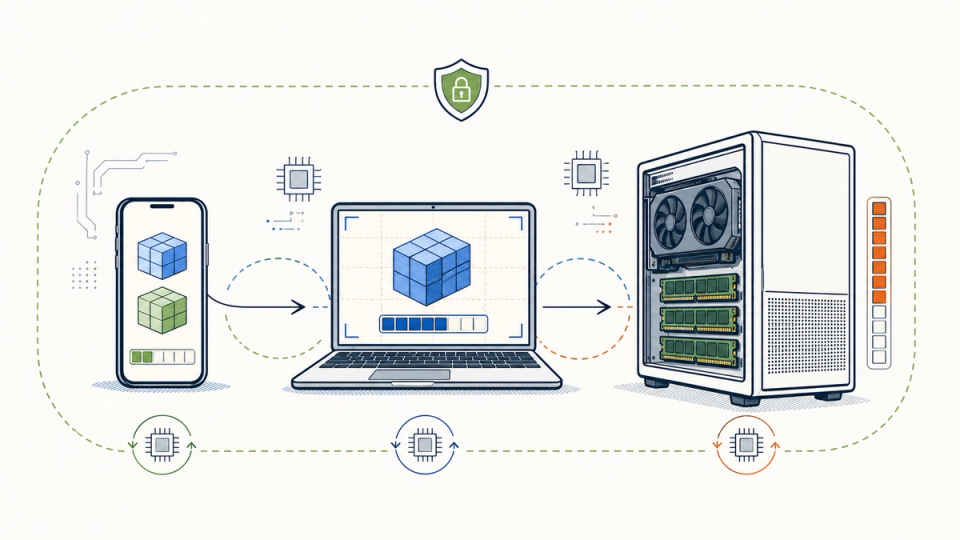
Gemma 4 is Google's open-weight multimodal model family, and it is practical to run locally if you choose the model by memory budget instead of by the largest parameter count. E2B and E4B are the phone and edge options, 12B is the sensible laptop tier, and 26B A4B or 31B belong on a workstation with enough accelerator memory.
The useful answer to "can I run Gemma 4 locally?" is therefore not a yes or no. It is a hardware ladder. On a recent phone, Gemma 4 can be a private offline utility. On a 16 GB laptop, it can be a responsive assistant if you stay near E4B or 12B Q4. On a machine with 8 GB of RAM, it is still possible to load a small model, but calling it a comfortable assistant would be generous.
This guide focuses on the decision people actually need to make: which Gemma 4 variant to download, which runtime to use, what latency to expect, and where privacy claims stop being true. It also explains why Gemma 4 is not automatically a better local choice than Llama, Qwen, or Mistral.
The Quick Answer
What should I run?
Use Gemma 4 E2B on a phone or very constrained device, E4B on a laptop with limited memory, and 12B Q4 on a laptop or desktop with roughly 8 GB of free accelerator memory. Treat 26B A4B and 31B as workstation models.
How do I start?
On a laptop, install Ollama, run ollama run gemma4:e4b or ollama run gemma4:12b, and test the local API. On a phone, use a mobile runtime such as LiteRT-LM with Google's mobile-optimized E2B or E4B checkpoint. Google AI Edge is an application-development path, not a one-click desktop chat app.
The non-obvious truth: the model file is only the first memory cost. Context cache, image tokens, the runtime, your operating system, and other open applications determine whether local AI feels instant or like a laptop fan auditioning for a jet engine.
What Gemma 4 Actually Is
Gemma 4 is a family, not one model. Google lists five variants: E2B, E4B, 12B, 26B A4B, and 31B. The E models use effective parameter counts designed for edge deployment. The 26B model is a mixture of experts model with about 3.8 billion active parameters per token, but all of its weights still need to be loaded for fast routing. The 31B model is dense.
All five accept text and images. E2B, E4B, and 12B also support audio input according to Google's model overview. The small models have a 128K context window, while 12B, 26B A4B, and 31B support 256K. Those context numbers describe a capability ceiling, not a promise that your laptop can fill the window cheaply.
Gemma 4 also supports a system role, thinking controls, function calling, and a draft model for speculative decoding. Those features make it more useful as an assistant than a bare text-completion model. They do not remove the basic physics. More context means more memory. Images and audio mean more preprocessing. Thinking means more generated tokens and more latency.
Google's model documentation describes the E variants as models for "ultra-mobile, edge, and browser deployment" (model overview). That is the right mental model. E2B is not a tiny version of 31B. It is a different point on the capability and hardware curve.
The Memory Table That Matters
Google publishes approximate inference memory for the static model weights. Its table includes roughly 20% loading overhead, but excludes the dynamic memory used by the context window and supporting applications. The Q4 figures are the most relevant starting point for laptop users.
| Variant | BF16 memory | Q4_0 memory | Intended starting point | Practical read |
|---|---|---|---|---|
| E2B | 11.4 GB | 2.9 GB | Phone, edge device | Best chance of a genuinely mobile experience |
| E4B | 17.9 GB | 4.5 GB | Phone, laptop | The balanced constrained-device option |
| 12B | 26.7 GB | 6.7 GB | Laptop, desktop | Best general assistant tier for many personal machines |
| 26B A4B | 57.7 GB | 14.4 GB | Workstation, small server | MoE saves compute, not the weight-loading problem |
| 31B | 69.9 GB | 17.5 GB | Large workstation | Quality ceiling, poor default for ordinary laptops |
These are not purchase recommendations. They are load estimates. Leave headroom for the runtime, the operating system, the KV cache, and your browser. If a model needs 6.7 GB just to load, an 8 GB GPU is not an 8 GB assistant machine.
The best rule is to reserve at least 25% of available memory for everything around the model. For 12B Q4, that makes 8 to 10 GB of free accelerator or unified memory a much more comfortable target than 6.7 GB. For E4B, 6 GB free memory is a reasonable starting point. CPU-only execution can work, but memory capacity does not predict a pleasant response time because bandwidth becomes the limiting factor.
Which Gemma 4 Model Fits a Laptop?
Choose E4B for an ordinary 16 GB laptop, 12B Q4 for a machine with 16 GB or more of unified memory or a dedicated GPU with enough headroom, and do not choose 26B or 31B unless you have measured the workload you care about. A larger model that interrupts your work is a smaller assistant in practice.
Google's get-started guide maps E4B to mobile devices and laptops, 12B to laptops, desktops, and small servers, 26B A4B to desktops and small servers, and 31B to large servers or clusters. That mapping is more useful than an internet comment claiming that a particular model "runs" on a particular laptop.
Use this decision rule:
| Your machine | Start here | Use it for | Stop when |
|---|---|---|---|
| Phone with 8 GB RAM | Gemma 4 E2B mobile | Short notes, OCR, offline classification | Thermal throttling or poor instruction following dominates |
| Phone with 12 GB or more | Gemma 4 E4B mobile | Image questions, rewriting, compact assistants | Battery drain matters more than offline access |
| Laptop with 16 GB system memory | E4B Q4 | Summaries, drafting, lightweight coding | CPU fallback makes every turn interruptive |
| Apple Silicon or GPU laptop with 16 GB unified/VRAM | 12B Q4 | General assistant, code review, document work | Long context consumes the headroom |
| Desktop with 24 GB or more accelerator memory | 26B A4B Q4 | Higher-quality reasoning and multimodal work | Cold starts and power cost erase the benefit |
| Workstation with 32 GB or more free memory | 31B Q4 | Quality-first local serving | You need a laptop-like experience |
The table is intentionally conservative. Vendor memory figures are reproducible starting points. They are not latency benchmarks, and they do not account for your exact Metal, CUDA, Vulkan, or CPU path.
How to Run Gemma 4 Locally With Ollama
Ollama is the shortest path from a laptop to a local chat endpoint. It handles the model package, runtime, chat template, and local HTTP server. Start with a small tag, verify that the model stays on the accelerator, and only then move up the ladder.
Install Ollama for macOS, Windows, or Linux. Then pull and run one of these models:
ollama run gemma4:e2b
ollama run gemma4:e4b
ollama run gemma4:12b
The current Ollama Gemma 4 library lists gemma4:e2b at about 7.2 GB, gemma4:e4b at 9.6 GB, gemma4:12b at 7.6 GB, gemma4:26b at 18 GB, and gemma4:31b at 20 GB. Download size is storage guidance, not the same as runtime memory. The package can be smaller than the memory needed for a long prompt.
To test the local API:
curl http://localhost:11434/api/chat \\
  -d '{
    "model": "gemma4:12b",
    "stream": false,
    "messages": [
      {"role": "system", "content": "You are a concise local assistant."},
      {"role": "user", "content": "Summarize why local inference is useful in three bullets."}
    ]
  }'
Ollama's library exposes the same family through the gemma4 tag and documents the ollama run commands for E2B, E4B, 12B, 26B, and 31B. It also handles Gemma 4's system role and thinking format, which removes a common source of broken local prompts.
Do not expose port 11434 to the public internet. Local Ollama requests normally do not need an API key, so a network-accessible endpoint is an unauthenticated model service. Bind it locally, or put an authenticated reverse proxy in front of it before sharing it with another device.
For Apple Silicon, test the MLX variants when Ollama lists them. For a more controlled or portable setup, Google's official QAT GGUF checkpoints work with llama.cpp and LM Studio. The important part is not the brand of the launcher. It is choosing a quantized checkpoint and measuring the full workflow.
How to Run Gemma 4 on a Phone
Phone deployment is a different engineering path from laptop deployment. Use Google's mobile-optimized E2B or E4B checkpoints with LiteRT-LM, or use a compatible mobile app that already packages that runtime. Do not download a desktop GGUF and assume Android or iOS will provide the same experience.
Google's mobile QAT collection provides E2B and E4B checkpoints with the -mobile-transformers and -mobile-ct formats. The Google AI Edge stack is designed to run LLMs across Android, iOS, web, and embedded devices. Its LiteRT-LM runtime is the relevant layer for a real app, while the Google AI Edge Gallery is the easier way to explore on-device models without writing the app yourself.
The mobile memory estimates are much lower than desktop Q4 estimates: Google's model card lists about 1.1 GB for E2B mobile and 2.5 GB for E4B mobile, with text-only estimates of 0.84 GB and 2.2 GB. Those figures explain why E2B and E4B can fit on a phone. They do not mean every phone will feel fast. Sustained generation is bounded by the device's memory bandwidth, NPU/GPU support, thermal envelope, and whether another app is competing for RAM.
For a phone assistant, begin with tasks that tolerate short responses: extract text from a photo, rewrite a message, classify a note, or answer a question about a small local document. Long-form reasoning is a poor first test because it turns latency and battery into the product experience.
If your phone is the interface but your laptop is the compute box, a local-network client can be a better design. Run Ollama on the laptop, keep the endpoint private on your home network, and connect from the phone. That is not on-device inference, but it often gives better quality, longer context, and less battery drain. Label it honestly as local-network inference, not phone-local AI.
Is Gemma 4 Actually Fast Enough?
There is no honest universal tokens-per-second number for Gemma 4. The same checkpoint can feel instant on a high-bandwidth Apple Silicon machine, acceptable on a dedicated GPU, and frustrating on CPU-only hardware. Measure time to first token, steady-state tokens per second, and completion time on your real prompts.
A useful local latency test has three runs:
- A short 50-token answer after the model is warm.
- A 500-token answer after a normal work session.
- A 10,000-token document task with the context you actually use.
Record cold-start time, time to first token, generated tokens per second, total wall-clock time, peak memory, and whether the machine remains usable. The third test is the one most demos avoid. It exposes KV-cache growth, thermal throttling, and the cost of sending a large document through a model that looked fast on "hello world."
Quantization usually improves fit and speed at some quality cost. Google's QAT checkpoints are designed to preserve more quality than naive post-training compression, but the practical result still depends on the runtime and task. A Q4 model that follows your format reliably can be more useful than a higher-precision model that leaves no memory for your application.
Thinking modes change the tradeoff again. Use thinking for difficult reasoning, code planning, or ambiguous documents. Disable it for rewriting, extraction, and short classification. The right default is task-specific, not a permanent badge of model quality.
Gemma 4 vs Llama 4, Qwen, and Mistral
Gemma 4 wins when you want one family that spans phone, laptop, and workstation deployment. Llama 4 wins on ecosystem and multimodal familiarity. Qwen is often the better first experiment for coding-heavy users. Mistral is compelling when you already operate a self-hosted serving stack. Hardware fit should decide the shortlist before benchmark rank.
| Family | Local advantage | Practical limitation | Choose it when |
|---|---|---|---|
| Gemma 4 | Broad edge-to-workstation ladder, official mobile formats, multimodal input | Smaller variants give up capability; Google and runtime versions move quickly | You want one deployment family from phone to laptop |
| Llama 4 | Large ecosystem, many tools and fine-tunes, strong community support | The headline context and larger variants can demand serious memory | Integration breadth matters more than phone deployment |
| Qwen | Strong coding ecosystem and flexible thinking/non-thinking workflows | More variants mean more packaging and prompt-template choices | You are prepared to tune a developer-oriented stack |
| Mistral | Good self-hosting story and familiar serving tools | Larger models are not casual laptop installs | You already have a private inference server |
The existing local AI assistant comparison goes deeper on model-by-use-case selection. The useful distinction here is deployment shape. Gemma 4's strongest practical advantage is not that it dominates every benchmark. It is that E2B, E4B, 12B, 26B A4B, and 31B let you scale a workflow without changing model family or prompting philosophy.
That advantage matters for teams shipping an app across devices. It matters less for a developer who only wants the strongest coding model on one 24 GB GPU. In that case, test Gemma 4 against Qwen and Mistral on your repository rather than importing a general ranking. The same hardware-first thinking applies to training a small language model for a niche workflow, where the task and evaluation set matter more than parameter-count prestige.
What Local Privacy Does and Does Not Mean
Local inference keeps prompts and generated text on the machine running the model. It does not automatically make the whole application private. Downloads, update checks, telemetry, remote connectors, synced files, and the websites you fetch can still disclose information. Privacy is a system property, not a model property.
If you run a local chat with a file already on disk, the inference request can remain offline. If you ask the assistant to summarize a webpage, your browser or fetcher still contacts the site. If you connect a phone to Ollama on your laptop, the phone and network become part of the trust boundary. If you use a cloud-tagged model in Ollama, you are no longer testing local inference.
For a private assistant, make four boundaries explicit:
- Keep the model endpoint bound to localhost or an authenticated private network.
- Separate local files from tools that can upload, email, or modify them.
- Log which model and runtime handled sensitive prompts.
- Prefer offline tests before adding web search, remote MCP servers, or cloud fallbacks.
Google's official Edge stack supports on-device execution, and Ollama provides a local API. Neither one can guarantee that your surrounding application never sends data elsewhere. Audit the whole path. For a broader view of the same privacy boundary, see Google's local AI dictation approach.
The Edge Cases That Break the Demo
The first failure is memory pressure. A model loads, a browser opens a large tab, and the operating system starts swapping. The chat still returns an answer, so the demo is technically successful. The assistant is practically unusable.
The second failure is context inflation. A 256K window encourages people to paste everything. More context increases memory and can reduce attention quality. Start with a small, relevant excerpt and measure before adding retrieval or a larger window.
The third failure is modality cost. A photo, PDF page, or audio clip is not free input. It becomes tokens or intermediate representations, consumes memory, and often changes latency more than the text prompt does.
The fourth failure is false privacy. Local generation can coexist with cloud file sync, remote model downloads, a public Ollama port, or a tool that uploads every attachment. Draw the data-flow diagram before calling the setup private.
The fifth failure is model drift. Tags change, runtimes update, and community quantizations vary. Record the exact model tag, checkpoint source, runtime version, device, prompt, and output quality for any workflow you intend to depend on.
The Honest Take
The memory table is the strongest public planning signal I found, not a promise of performance. Google explicitly says the estimates can change with the inference tool and environment. The figures also exclude context-cache growth. Your own three-prompt test is more useful than a benchmark screenshot.
The phone story is viable but narrow. E2B and E4B make offline text, image, and audio utilities possible on supported devices. They do not turn a phone into a quiet 31B workstation. Battery, heat, and response time are part of the user experience.
The comparison is also incomplete by design. Llama, Qwen, and Mistral may have better fine-tunes, tools, or coding behavior for your workload. Gemma 4's hardware ladder is a reason to test it first, not a reason to skip testing.
The biggest unknown is sustained latency. Vendors publish capabilities and approximate memory. They do not publish one number that describes your laptop, your context length, your runtime, and your thermal limits. Measure that before promising an offline assistant to anyone else.
The Bottom Line
Gemma 4 is viable locally, but only when "local" is matched to a device class. Start with E2B or E4B on a phone, E4B on a constrained laptop, and 12B Q4 on a laptop with roughly 8 to 10 GB of free accelerator or unified memory. Reserve 26B A4B and 31B for workstations.
Use Ollama when you want the fastest laptop setup. Use Google AI Edge and LiteRT-LM when you are building a real mobile app. Test warm and cold latency, include a long-document task, and audit the network boundary before calling the system private.
The practical decision rule is simple: choose the largest Gemma 4 variant that stays responsive while your normal work is open. If that answer is E4B, you have not failed. You have chosen an assistant you can actually leave running.
FAQ
Can Gemma 4 run on a laptop with 8 GB of RAM?
E2B or E4B may load with aggressive quantization, but an 8 GB machine leaves little room for the operating system and context cache. Expect CPU-heavy inference and limited multitasking. For a comfortable assistant, 16 GB of system or unified memory is a better starting point.
Can I run Gemma 4 on an iPhone or Android phone?
Yes, with a supported mobile runtime and mobile-optimized E2B or E4B checkpoint. Google's AI Edge stack targets Android, iOS, web, and embedded devices. Availability and performance depend on the device, runtime integration, and thermal limits.
Is Gemma 4 12B better than E4B for a laptop?
Usually, 12B offers a higher capability ceiling, especially for multi-step work, but it needs more memory and can be slower. E4B is the better choice when responsiveness, battery, or multitasking matters. Test both on your real prompts rather than assuming the larger model wins.
Can I use Gemma 4 without an internet connection?
Yes, after downloading the model and runtime. Ollama can serve local inference without a cloud request. Any workflow that fetches websites, syncs files, calls remote tools, or uses a cloud model is no longer fully offline.
Does Gemma 4 replace Llama 4 or Qwen for local AI?
No. Gemma 4 is a strong default when cross-device deployment and official edge formats matter. Llama has ecosystem breadth, Qwen is attractive for coding and experimentation, and Mistral can fit an existing private-serving stack. Choose by task and hardware.
How do I measure local AI latency?
Record cold-start time, time to first token, steady-state tokens per second, total completion time, peak memory, and whether the machine remains usable. Run the same short answer, long answer, and real document task on every candidate model.